Don't Clog the Tubes!
OK, my favorite Chrome Easter egg (actually, the only one I’ve heard, but still, so awesome) is if you type “about:internets” in the address bar. Too funny.
I got a “prototype system” up and running for a media center solution using my new Windows Home Server as the storage for the video. I set up a new shared folder called “DVD” on the home server and fixed it so it’s not using file duplication (no need eating up double the amount of space for each movie), then ripped a disc to it.
My laptop is running Vista Ultimate, so I set up the DVD Library to automatically watch for movies in the DVD shared folder and enabled it to play VIDEO_TS folder structures following the instructions here. Doing this worked perfectly and it played the ripped disc as though I had put it into the local drive. Exactly what I was looking for. It even played without glitches over the wireless network, which was surprising, but very cool.
The next step is to figure out how I want to deal with the media center itself. I know I’m going to need some sort of dedicated machine, so that will probably end up being a Mac Mini, similar to the “death of DVD” story I was reading. The question is, what software do I want to run?
There are technically a lot of other choices for both platforms, but I’ve ruled out non-Windows-Media-Center choices for the Windows platform because I really don’t need most of the options the other servers offer and I don’t want to hassle with a lot of extra configuration and hackery. I didn’t list any different platforms for the Mac because, frankly, I’m ignorant. I’m really hoping to keep it simple, though, so as much out-of-the-box, it-just-works as I can get, the better.
It looks like it boils down to a small hierarchy of choices:
I’ll do a little more research on Front Row, but my media center solution is getting close…
Yesterday
the entire Voyager User Solutions and
Infrastructure teams went downtown Portland
to do a photo scavenger hunt. We were broken up into three teams - Red,
Yellow, and Blue, and ran around taking pictures of ourselves with
various landmarks.
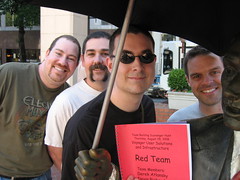
Jeff, Derek, I, and Devin were on the Red Team.
We started out at Pioneer Place around noon for lunch, then at 1:00p met up in Pioneer Courthouse Square to get our clue packets and get moving. From then until about 3:30p we went everywhere from Powell’s Books to Skidmore Fountain to the Portland Art Museum and the Oregon Historical Society getting pictures.
After an extremely exhausting day, all of the teams reconvened at the Pinocchio Bar and Restaurant for happy hour and dinner.
A great time was had by all. We learned a few things about Portland that we didn’t know (and I’ve lived here my entire life!) and came out all the better for it.
Maybe next time we’ll go skydiving…. nah.
Finally completed Grand Theft Auto 4 100% this morning!

Pretty stoked about that. Turns out the last bits I had to do, as I suspected, was to take my friends out to do all the activities.
I also got the “Walk Free” achievement this morning - escaping a four-star wanted level alive. Secret to that one is to land a helicopter in the embassy and get out (instant four-star wanted level), then fly the helicopter to a secluded beach in the north where there’s a boat. Get in the boat and just avoid the other boats, which isn’t too hard. Might try for some of the others, like “One Man Army” (survive five minutes with six-star wanted level), but generally, after 80 hours, I’m pretty much done. I love the game, had a great time with it, definitely got my money’s worth, but there are other games I have
After
pondering various
options for media
center related storage, Jenn and I happened to be walking through
Fry’s this weekend and saw they had dropped
prices on HP MediaSmart
Servers
quite a bit so we bit the bullet and got the 1TB model.
So far, I like it quite a bit.
The form factor really surprised me. It’s small. Like, so small we walked right past it in the store and didn’t even notice it. We ended up asking where they were and when we saw it we were surprised by the size. I expected a mini-tower; it’s really only about nine inches tall and five inches wide. The whole package is fairly aesthetically pleasing so if you don’t have a desk to put it under, it’s not going to look bad sitting in plain sight.
Setup went surprisingly smoothly, which is far better than I can say about most of the electronics purchases I make. I always find there’s something “special” about my environment, even though I try not to do anything too out of the ordinary, and it makes things that are supposed to be simple very difficult. The only hitch I ran into during the setup was something they warn you about several times in the guide: your firewall/antivirus software may cause the server not to be found from your network, so you may have to adjust accordingly. I shut it down long enough to connect to the home server and everything is peachy keen. (Of course, the Home Server detected I had the firewall shut down, so for a few minutes I couldn’t figure out why it kept telling me my “network health was critical.” Eventually I got things set up enough that it was able to tell me very clearly that the firewall was down. Putting it back up restored network health to normal.)
The server is headless, so you control it entirely through the “Windows Home Server Console,” a remote desktop style application. It’s very easy to use, not giving you so many thousands of configuration options that you don’t know what to click - it’s clear and concise, which is a huge relief. It removes the burden of finding the checkbox hidden 15 levels deep and “just works.”
Actually, the level of configuration reminded me of a game console. Like when you set up your Xbox 360 or Playstation 3 on the network and configure one or two things - you don’t have to deal with verifying the drivers are set up right, or tweaking the registry to get it to perform, or running command-line programs to register or configure things… it just works. It will even configure your router for you through UPnP if you want to expose your server on the internet so you can get to your media remotely. I’d never seen that before and I wonder why it’s not available in things like the Xbox 360, which requires certain ports to be open to connect to Xbox Live.
The only real complaint I have, if you could call it that, is that it’s so high-level that it doesn’t really reveal what some of the functionality is doing behind the scenes. For example, there’s an iTunes sharing function on it that I’d love to use instead of my multi-user iTunes hack, but I’m not sure how it works so I’m reluctant to start moving things around onto the server before I understand what it’s doing… but there’s nothing in the docs to explain what’s going on beyond explaining how to configure it.
Regardless, this solves my media storage problem, so at the very least I can start ripping DVDs in VIDEO_TS format and saving them here. My laptop has Vista Ultimate on it, and I have another license for it that I can put on my Windows XP desktop (once I’ve migrated the shared data off there - it’s my “file server” right now), so I can try out My Movies on one of those and see how it goes.