Increase Your Windows Home Server Capacity With eSATA

For my media center solution, I'm using a Windows Home Server as my primary storage for everything - music, photos, DVD images, videos, computer backups... the whole shmear. I love it. I bought the 1TB HP EX-475 model and did a few upgrades, adding memory and filling out the drive bays.

After ripping all of my movie DVDs to the server, I had about 470GB left - plenty for music and photos, but not enough for me to rip my TV DVDs to the server and have those available in the library.

I considered adding storage through USB drives, but they recommend only plugging directly into the server's USB ports and not using a hub... and there are only four ports. I know I'm going to use one of them soon for off-site backups. So... how to add drives in a scalable fashion?

The answer: Use the eSATA port on the back of the home server.

I picked up a Rosewill RSV-S5 5-bay eSATA port multiplier and two 1TB WD Caviar Green drives on a great sale at NewEgg. Plugged the drives into the port multiplier, plugged the port multiplier into power, shut down the home server, connected the port multiplier to the home server, and powered on the port multiplier then the home server. No software to install, no fuss, no muss. After adding the drives to the storage on the home server, I'm up to 4.55TB total storage with 2.2TB free!
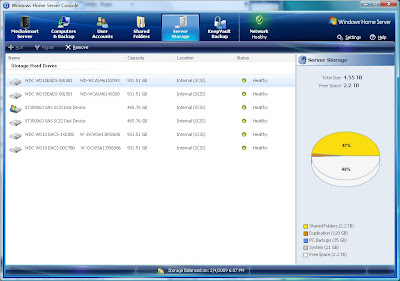
My WHS control panel: 4.55TB total, 2.2TB free.

The nice thing is I have three more eSATA bays free in the port multiplier so I can easily continue expanding. Plus I haven't taken up the USB ports yet so I still have all of that to go, too. An easy upgrade that enables even easier future upgrades - you can't beat it. Next to adding RAM, I'd say this is the most valuable thing you can do to your home server.

UPDATE 6/16/2010: Beware the WD Green drives. Only some of the model numbers perform well. I ended up replacing some of the ones I had bought when I originally wrote this post.

posted on Wednesday, February 04, 2009 6:29 PM | Filed Under [ Media GeekSpeak ]

Comments

Gravatar # re: Increase Your Windows Home Server Capacity With eSATA
by Sadge at 2/4/2009 8:26 PM
Reading around, though -- I'd check out the 5th drive bay in the unit you purchased. A lot of people have been complaining that it doesn't recognize the 5th drive (although I don't know if it's been addressed yet -- I doubt it though).
Gravatar # re: Increase Your Windows Home Server Capacity With eSATA
by Travis Illig at 2/5/2009 7:57 AM
I've read around and the only two problems I've heard with this unit are:

1) The RAID support can be tricky - some people can't get it to work, others can.

2) The drivers for the included PCIe card are stale.

Neither of these are issues with the Windows Home Server - you don't install the PCIe card (it already has an eSATA port) and you don't install the drivers (you shouldn't be trying to run the software-based RAID they provide - you're just adding the drives to the WHS storage).

Unfortunately, testing the fifth bay in the unit would mean I need three additional SATA drives that I don't have because you have to load the drive bays in order and I only have drives in the first two bays right now. It'll probably be a while before I get those filled, though if I end up having issues, I'll definitely post about it.
Gravatar # re: Increase Your Windows Home Server Capacity With eSATA
by Sadge at 3/6/2009 6:11 AM
So I ordered this enclosure from NewEgg to put on my HP WHS. It was defective. Got a replacement, that was defective. I guess I'm using up all my good luck on this.

I'm going to go with a different 4 bay model instead and hope for the best.
Gravatar # re: Increase Your Windows Home Server Capacity With eSATA
by Travis Illig at 3/6/2009 7:40 AM
Interesting. Sorry you had bad luck. Mine worked right out of the gate. ("Works on my box!")
Gravatar # re: Increase Your Windows Home Server Capacity With eSATA
by Sadge at 3/6/2009 8:00 AM
Yeah I hate you =)

I don't know what the deal is. The unit would power on and it seemed like it was powering up the hard drives, but I wasn't getting any LED's except for the top one of the botom drive. I thought maybe it was a batch of bad hard drives (I ordered 4x 1.5TB and 1x1TB), so I tested them out and they were fine. I ended up called tech support, but the guy wasn't able to help me out except to confirm that the unit was defective. When I powered the 2nd one up and had the same problem, I pretty much said screw it and ordered a different one. They all seem to be identical (just different company names), but I'm holding out hope.
Comments have been closed on this topic.