
Overview of My Media Center Solution
UPDATE 7/8/2015 - All current documentation for my media center and home network is at illigmediacenter.readthedocs.io.
Now that I’ve solved my media center problem, let me do a review of what I was trying to do, what I did, and some of the lessons learned along the way.
Goals of my media center solution:
- Access to my DVD collection. I have a lot of DVDs and, yes, I do like to re-watch them. The problem I’m running into is the same problem I ran into with my music collection - inconvenient access. I think about a movie I want to watch, then I have to go through the collection, find it, fire up the system… it’s a lot less “at my fingertips” than I’d like. It’s also nearly impossible to browse, so if I want to look for something to watch, I have to either riffle through the binders of discs, use an outdated printout list of movies, or fire up DVD Profiler and scan through there.
- Backup solution. My dad and I both have had DVDs go bad. Ideally I’d like to be able to re-burn a disc if I have the original go bad. UPDATE: I’ve changed my position on this since the original setup and I’m only storing the movie files now.
- Full quality, all features. I want to be able to navigate and view the DVD as if I had put it into a DVD player - full menus, no reduced quality, all audio tracks, all extra features. UPDATE: I’ve changed my position on this since the original setup and I’m only storing the movie files now.
- Wife acceptance factor. I want it to be easy and accessible to Jenn so she can use it, too, without having to memorize the 37-button-sequence to get it working.
- Network storage. I want everything to be stored centrally so the data can be accessed by any device.
Secondary goals:
- Simple, simple, simple. As few “moving pieces” as possible. I know there are ways to get very fancy setups going if you want to invest the time and effort in tweaking, perfecting, and messing about with the system. I’m not a hobbyist, and investing that level of time doesn’t interest me. I want to set it up and have it “just work” in as much an appliance fashion as possible.
- Expandable. If I need to add storage, add another media front-end, etc., I want the flexibility to do that.
- Good form factor. I don’t want something ridiculously ostentatious sitting in the living room. I want it to look good.
- Music and picture access. DVDs are my primary goal, but if I can get access to my music and pictures through the system, so much the better.
What I settled on:
- Storage - Two Separate Systems:
- Windows Home Server. For music, home movies, photos, and documents I went with a Windows Home Server as the central storage mechanism. It gave me some great first impressions and I learned a lot even two weeks in, but I’ve never looked back. WHS got a bad rap early on with some data corruption defects that have been fixed and I think people really need to give it a chance. It has a great form factor, is totally expandable, and has all of the DLNA sharing pre-configured for easy access to music, pictures, and videos for compatible devices. It plugs in and “just works,” appliance-style, and even provides additional features like monitoring your network health and backing up your PCs. Dollar for dollar, I’d take this over a generic NAS any day. (That said, there are some recommended upgrades you might want to do to make the most of your server.) UPDATE: I originally used Windows Home Server as the single storage solution, but ended up adding the Synology NAS and switching the DVD images to that.
- Synology NAS. I went with the Synology DS1010+ for movie storage. I did this because I ran into some odd disk-related issues with the home server (bad drives) and since I didn’t have enough disk space to turn on duplication for my DVD images, I wanted to figure out some sort of fault tolerance if a drive went out. The DS1010+ will let me run RAID 5 and is super fast, so I moved to that for the DVDs.
- Front-End Software - Windows 7 Media Center and XBMC. I looked
at MediaPortal,
TVersity, Front
Row,
Xbox Media Center, just using the Xbox 360 as a
media extender, and several other front-end software packages, but
Windows Media Center initially won out for several reasons. First,
it comes bundled with the OS - fewer moving pieces (unlike an
additional application you’d have to install, e.g., TVersity).
Second, it’s handled VIDEO_TS DVD rips for quite some time (unlike
Front Row, which only just recently got it and has no real
documentation out there available for it). Third, it handles almost
all of the other formats I use for pictures, music, etc. (unlike
Xbox 360 as a media extender, which doesn’t support full DVD rips).
- UPDATE 12/14/09: I updated to Windows 7 from Windows Vista and it made a lot of difference in performance - smoother playback, faster loading of the DVD Library, etc.
- UPDATE 12/29/11: I have just started using XBMC as the front end instead of Windows Media Center because the rendering of the DVD library is much faster than Windows Media Center, especially with a lot of movies. It also has a much nicer UI with art and info than the more sparse WMC UI.
- Video Format - VIDEO_TS. I blogged about the pros and cons of various video formats, and in the end I picked VIDEO_TS as the format I’d rip my DVDs into since it was most compatible with the various software packages and didn’t require any additional tweaking in Media Center to use. Plus, it gives full access to the disc features (menus, etc.), you don’t lose any quality, and you can re-burn VIDEO_TS to a DVD and have a watchable disc just like the original.
- Front-End Hardware - Dell Studio Hybrid PC. I picked up a Dell Studio Hybrid PC to be the hardware sitting in my living room. It has a great form factor and all the right connections (DVI, HDMI, S/PDIF audio) to make it a perfect media center PC. I had considered getting a Mac Mini, as several other folks have done, and run Boot Camp to boot into Vista, but the Studio Hybrid was far cheaper and more powerful than the top-end Mac Mini.
How it works:
I set up the “DVD Library” in Windows Media Center rather than using the popular My Movies plugin because, again, I really wanted as few “moving pieces” as possible and My Movies didn’t seem to offer me anything I truly needed. If, at some later time, I want to start using it, I haven’t engineered myself out of it - I can install it and import the movies that already exist with a minimal amount of work.
I rip my DVD movies onto the Synology DS1010+. The Dell Studio Hybrid PC, which is connected to the TV in my living room, reads the list of movies from the NAS over the network and displays them beautifully on the TV for me to select from. I was running this nicely over wireless, but started running into interference issues, so it’s now a wired network.
My photos are accessible through not only the Windows Media Center, but also through my Xbox 360 and PS3 via the DLNA sharing that comes for free out-of-the-box with my Windows Home Server.
My music is accessible to DLNA compliant devices (Xbox 360, PS3) through Asset UPnP on the Windows Home Server. Windows Media Center doesn’t natively play Apple Lossless (though with Windows 7 it does play AAC) so I don’t have it running through the Media Center.
Diagram:
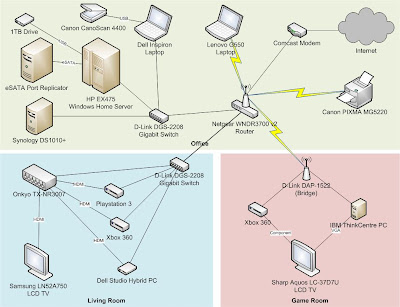
Here’s a picture of the current network topology, with a little added detail around how things connect to my TV. It’s pretty simple, not a lot of moving pieces, and the majority of things are wireless. As much as possible is also connected directly to the network (like my printer) so I can access anything from anywhere.
Lessons learned:
- Everything in Home Theater PC-land is tribal knowledge. It took the majority of my time to figure all of this out because there are far too many options with far too few people providing information in accessible locations. Most information on this stuff lives in forums, making it hard to pick through and figure out what’s going on. When you ask questions, people assume you already know a bunch of stuff you don’t know, so you get very cryptic answers, which you then have to go research and ask more questions about.
- Format wars are a pain. I’m specifically looking at you, WMA vs. AAC. There’s no good reason I can find that the Apple formats aren’t supported out of the box by Media Center other than the desire to remain proprietary. Garbage. (With Windows 7, AAC is supported but Apple Lossless still isn’t.)
- Even in a simple environment, things are fiddly. Getting everything stored centrally, updated properly, displaying right, with correct access… it’s trivial, annoying, fiddly stuff. Tweak this registry setting, add a symbolic link to this folder, map this drive, configure this setting… it’s a pain, and if you don’t get it right, things don’t work as smoothly as you’d like.
Next steps:
So, now that it’s done - two years in the making - what am I going to do next?
- Music access: I’m looking at MCETunes to enable access to my iTunes content in Media Center. [UPDATE: I found you can get Media Center playing iTunes files natively by adding some codecs and metadata tag parser support. I also found you can use Windows Home Server add-ins to stream music to Xbox 360 and PS3 that wouldn’t normally work.] [UPDATE 2: I’m using Asset UPnP for DLNA streaming/transcoding of Apple Lossless, etc., to Xbox 360 and other DLNA compatible devices.]
- Front-end upstairs: I have a spare desktop (the ThinkCentre) that I may put upstairs so we can access the same DVD content in another room. It’s not as nice of a form factor, but that’s less concerning in the game room. [UPDATE: I did end up moving that ThinkCentre upstairs and it’s working well.]
- Finish ripping movies: I have 90 movies on the server right now, but 500+ titles. I’ve gotta get these things ripped. I won’t rip every single one of them, and probably won’t rip the “extended features” discs, but that’s still a lot of work left to do. [UPDATE: I finished ripping all of my movie discs - no extra features discs - and have 770 VIDEO_TS folders taking up 4.91TB of space on the Windows Home Server. That’s about 6.7GB per image.]
- Upgrade my MPEG2 codec: The built-in DVD player for Media Center is notoriously mediocre. It looks decent enough, but by upgrading your MPEG2 codec (and configuring Media Center to use it) you can get better playback quality. A lot of folks swear by the NVidia codec which you can buy separately or get with PowerDVD. [UPDATE:: XBMC uses FFmpeg to play DVDs and I’ve had some better luck with XBMC as the front end. Some discs that looked exceptionally bad… still don’t look awesome, but are at least better.]
- Fix the video resolution: The TV in the living room is a native 1366 x 768 resolution. The closest the Dell Studio Hybrid gets to that is 1280 x 768, which looks crisp but leaves a bit of a black letterbox on either side of the picture. I’d like to get it to display full-screen, but it looks like it involves some very fiddly stuff and a tool called DTDCalc. [UPDATE: Connecting the PC through HDMI to a newer TV yielded full 1080p resolution with no letterboxing.] [UPDATE 2: I upgraded the TV in the living room to a 1920 x 1080 set and still have no problems.]
Related posts:
I’ve done a lot of work to get this far, so there are quite a few related posts I’ve made that may be of interest. (Most of these, and more, are linked in the above article, but for your convenience, here are some highlights.)
- Setting up your DVD library:
- Windows Home Server:
- Dell Studio Hybrid Media Center Installed
- Getting iTunes Music to Play in Windows Media Center
- Stream More Music From Windows Home Server with Asset UPnP
- Moving to a Synology DS1010+