
QR Code Coaster Generator
I built a little in-browser app that can create a customizable, full-color 3D model of a coaster with a QR code on it, ready for printing. Go check it out!
There are a ton of these apps out there - apps that create QR codes and let you export them or put them on a 3D printable coaster, but I found there were problems with all of these:
- They’re not free. You want to export an SVG? Pay. You want to customize the logo in it? Pay. It seems like creating a QR code shouldn’t cost you.
- They require an account. Sign in before you finish! I’m not sure why. I think this is one of those “if you don’t know what the product is, you’re the product” things.
- They send stuff to a server. I do not want to send my guest wi-fi password to your server. I do not want to send my contact info to your server. I just want a QR code.
- They’re not feature-complete. They don’t have the options I want. Maybe the model is sub-par. Maybe getting a color print model is hard or manual. In most cases the 3D print part seems like a “bolt-on” instead of a real feature.
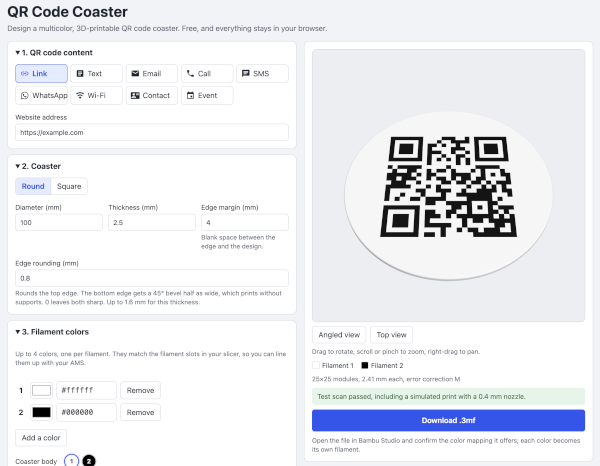
Key differentiating features:
- No server connection. All the work happens in your browser. The rendering, the testing, the generation of the downloadable model. Your information never leaves your machine. That also means there’s no account required, no payment required, it all just works.
- 3D printing first. The goal is a 3D printable coaster, not just a QR code generator that happens to also create a model.
- Print and scan testing. Simulated tests will run based on your selected nozzle size to see if you’ll be losing details or if you’ll have problems scanning the code after print. This allows you to correct the issues before finding out on the printer.
- Fixed color management. Choose up to four filament colors and ensure all colors used in the model match those colors.
- Nice edges. The top edge can be slightly rounded with the bottom edge at a nice fillet (no supports!) to make the edges nice instead of sharp.
- Highly customizable. Select from tons of options to make the coaster yours.
- Type and style of QR code.
- Logo/icon in the center of the QR code.
- Optional text above/below the code.
Once it looks how you want, you can download a .3mf file with the geometry, pre-colored using your palette.
I, personally, am a Bambu X1C owner, so I pop this open using Bambu Studio, match the colors to colors in my AMS, and I’m off to the races.
Give it a try! If you want to see more, the source code is here.