
Charting Hanselminutes
Before I even get into this, let me preface it by saying Scott’s a friend of mine and he’s a great guy. I told him I was posting this before I did it. It’s just some interesting data that I got in an interesting way and thought folks would be interested. It’s also intended to totally crush Scott’s spirit. (I kid! I kid!)
So.
I was just writing about how I was seeing more and more video blogs and was thinking about the earlier days of Hanselminutes when it seemed like the show was shorter. I wanted to make sure it wasn’t just my mind playing tricks on me so I did some data gathering. This is actually about the process I went through.
The idea: create a graph of the Hanselminutes podcast duration over time so a trendline can be established.
At first I thought it would be pretty straightfoward - I could grab the RSS feed and just parse out the duration info. Turns out they don’t actually list how long each show runs, so I had to change my tack and analyze the MP3 durations directly.
Step 1: Getting the MP3s.
I’m not a Powershell guru but this sounded pretty Powershell-ish to me. The thing is, I already had some tools that would do some of the job for me, so I didn’t write the whole thing in Powershell. It went like this:
- Grab the RSS feed for the show by just right-click and save-as from the site.
- Get the URLs for the MP3s. I used a command-line XPath query tool
for that, looking at
/rss/channel/item/enclosure/@url. That gave me a nice list of the URLs to the show. - Get the MP3s. This is where I did a little brute force Powershell scripting. I suppose I could have saved the list of URLs to a text file and then wrote a script that read in the lines from the text file, but I didn’t. I did a regex search-and-replace to create a script that looks like this:
$client = new-object system.net.webclient;$client.DownloadFile("http://perseus.franklins.net/hanselminutes_0185.mp3", "hanselminutes_0185.mp3");$client.DownloadFile("http://perseus.franklins.net/hanselminutes_0184.mp3", "hanselminutes_0184.mp3");$client.DownloadFile("http://perseus.franklins.net/hanselminutes_0183.mp3", "hanselminutes_0183.mp3");$client.DownloadFile("http://perseus.franklins.net/hanselminutes_0182.mp3", "hanselminutes_0182.mp3");...
Like I said, pretty brute force… but I’m not running this a bunch of times, I’m just doing it once.
Step 2: Getting the Duration from the MP3s.
This was harder than I thought. What you actually have to do for this is get the MP3 tag info and get the duration from that.
I used the open source TagLib# and wrote a tiny console app using SnippetCompiler that looked like this:
DirectoryInfo dir = new DirectoryInfo(@"C:\Documents and Settings\tillig\Desktop\Hanselminutes");FileInfo[] files = dir.GetFiles("*.mp3");foreach(FileInfo file in files){ TagLib.File tag = TagLib.File.Create(file.FullName); Console.WriteLine("{0}\t{1}", file.Name, tag.Properties.Duration);}
Again, could I have done that with Powershell? Sure, but I’m not too strong in Powershell and I haven’t had a chance to get too far beyond pretty basic stuff. And, again, I’m running it once.
So that gets me a tab-delimited text file with the name of the MP3 file and the duration.
Step 3: The Graph.
This was a simple import into Excel and add a graph. I won’t go through that.
The Result:
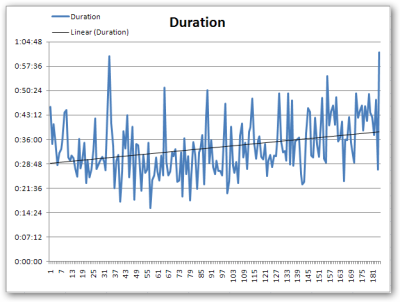
I was right - there is an upward trend in the Hanselminutes duration.
So… interesting.
UPDATE: If you want the data for your own enjoyment, here you go.